
Here you can set automatic deletion of information and documents, including personally identifiable information on customer cards, contracts, etc. You can also always delete them manually on the respective pages, and there is no difference between automatic and manual deletion in this regard.
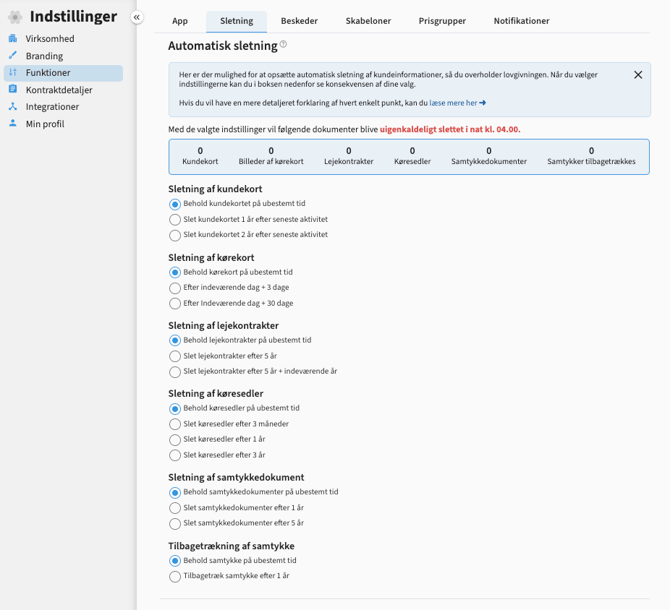
Deleting customer cards
“Keep customer card indefinitely”. When you select this option, the customer and all information on the customer card will remain on the dealer page until the customer card is deleted manually by selecting them in the customer list under the “Customers” tab and pressing “Delete marked” or by using the “Delete” button on the customer card itself.
“Delete customer card 1 year after last activity”. When you select this option, the customer card is automatically deleted after 1 year of no activity on the customer. Activities are a test drive, new consent, lease, closing slip, call, status change, change in follow-up date, assessment, email or notes. The time of the last activity is seen on the customer card under activities.
“Delete customer card 2 years after last activity”. These are the same rules - just after two years.
Note!
Statements and bookings in the calendar are anonymized when the customer sheet is deleted.
Deleting the customer card also deletes the driver's license on the customer sheet, but does not affect contracts and consents or vehicles.
Deletion of driving license
“Keep driver's license indefinitely”. When you select this option, the driver's license image will remain on the customer card on the dealer's side until it is deleted manually with the customer card by selecting them in the customer list under the “Customers” tab and pressing “Delete marked” or by using the “Delete” button on the customer card itself.
“After current day + 3 days”. When you select this option, the driver's license image will be automatically deleted 3 days after it has been taken and scanned in the app.
“After current day + 30 days”. These are the same rules - just after 30 days.
Note:
These settings only affect the image of the driver's license on the customer sheet and not the entire customer card or documents and contracts.
Deletion of rental contracts
“Keep leases indefinitely”. When you select this option, all leases will remain under “Contracts” on the dealer page until they are deleted manually by selecting them in the list and pressing “Delete selected” or by using the “Delete” button in the lower right corner of the document itself.
“Delete leases after 5 years”. These are the same rules - just after 5 years.
“Delete leases after 5 years + current year”. These are the same rules - just after 5 years + current year.
Note!
These settings only affect the deletion of leases and not the customers' consents for marketing, as it may be necessary to retain these. Settings for deleting consents are made under “Deleting consents”.
The settings also do not affect either the customer card or the image of the driver's license on the customer card.
Deleting waybills
“Keep waybills indefinitely”. When you select this option, all waybills will remain under “Contracts” on the dealer page until they are deleted manually by selecting them in the list and pressing “Delete marked” or by using the “Delete” button in the lower right corner of the document itself.
“Delete waybills after 3 months”. When you select this option, the waybills will be deleted three months after they have been created.
“Delete waybills after 1 year”. These are the same rules - just after 1 year.
“Delete waybills after 3 years”. These are the same rules - just after 3 years.
Note!
These settings only affect the deletion of waybills and not the customers' consents for marketing, as it may be necessary to retain these. Settings for deleting consents are made under “Deleting consents”.
The settings also do not affect either the customer sheet or the driver's license on the customer sheet.
Deletion of consent documents
“Keep consent documents indefinitely”. This is the document with the marketing consent that the customer has accepted via text message or signed in the app when they are manually created via the app, and not via, for example, rental contracts or test drives. When you select this setting, the document will remain under “Contracts” on the dealer page until they are deleted manually by selecting them in the list and pressing “Delete selected” or by using the “Delete” button in the bottom right corner of the document itself.
“Delete marketing consents after 1 year”. When you select this setting, the documents with the marketing consents are automatically deleted after 1 year. This has no effect on customer cards, test drive documents or rental contracts, these are not affected.
“Delete consents after 5 years”. These are the same rules - just after 5 years.
Withdrawal of consent
“Retain consent indefinitely”. When you select this setting, the consent for marketing on the customer card will not be withdrawn at any time. However, it will of course be removed in the event that the customer card is deleted.
“Withdraw consent after 1 year”. When you select this setting, the consent for marketing on the customer card will be automatically withdrawn 1 year after the last activity on a customer. Activities are a test drive, new consent, rental contract, closing slip, call, status change, change in follow-up date, assessment, email or notes. The time of the last activity is seen on the customer card under activities. This has no impact on either customer cards, test drive documents or rental contracts, these are not affected.
Comments
0 comments
Please sign in to leave a comment.