
If you need to add an extra driver to a rental contract, here's how to do it.
If you are in a situation where there must be multiple drivers of a loaner car, you simply need to be informed of the additional drivers' full names and driver's license numbers in order to add them to the contract via the system - even without the driver having to physically drive past again 👍😊
You can add the additional drivers in the following way:
- When creating a booking
- When creating the rental contract from your CarBuddii App
- Adding additional drivers to an active lease
-
When creating a booking
- If you have already received information from the customer when creating a booking that there will be more drivers for the rental car, then when creating the booking in your " Plan-It " calendar, you can use the field at the bottom of the booking window "Add extra drivers".
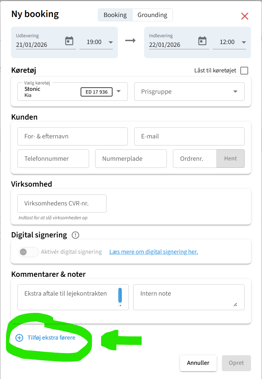
When you click on this, you will see a field for the driver's first and last name, as well as a field for entering the driver's license number.
- If you have already received information from the customer when creating a booking that there will be more drivers for the rental car, then when creating the booking in your " Plan-It " calendar, you can use the field at the bottom of the booking window "Add extra drivers".
-
When creating a rental contract from your CarBuddii app
- If you are creating the rental contract from your CarBuddii app, you can add an additional driver to the contract on the page that appears as soon as you have scanned the driver's license of the renter (driver number 1).
Simply press the "Add additional driver" button at the bottom before continuing to the next page.
As with adding during booking, you simply need to enter driver 2's full name and driver's license number. Only the renter (driver 1) needs to have his driver's license scanned.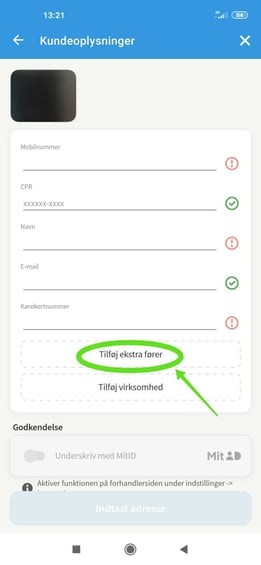
- If you are creating the rental contract from your CarBuddii app, you can add an additional driver to the contract on the page that appears as soon as you have scanned the driver's license of the renter (driver number 1).
-
Adding additional drivers to an active lease
- If you want to add an additional driver to an already active rental contract, this can be done from your CarBuddii calendar (Plan-it).
All you have to do is the following:- Double-click on the active rental in the calendar
- Press the "Add additional driver" button
- Enter your full name and driver's license number in the fields provided.
- Press "Confirm via SMS" or "Confirm via email", depending on whether the customer has received the contract sent via SMS or email.
- The customer will now receive a message with a link to update the contract, which they must click on and confirm the addition to the rental contract.
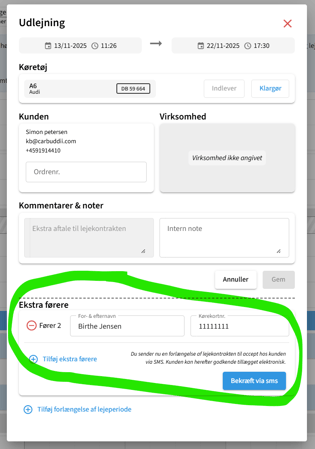
Once this is done, the contract's addition of the additional driver will be legally in place.
- If you want to add an additional driver to an already active rental contract, this can be done from your CarBuddii calendar (Plan-it).
If there is ever any doubt, we are ready to help you further via chat, email (info@carbuddii.com).
Really good rental to you! 🚗👍
Comments
0 comments
Please sign in to leave a comment.